nessus-2.0.8a の設定
作成 : 2003/01/21
nessus とは
セキュリティスキャナー。 ポートスキャンとか脆弱性テストとか、いろいろできる。 自分のホストのセキュリティチェックのみに使用すること。
nessus はサーバとクライアントから成る。 サーバは Unix 系システムでのみ動作する。 クライアントは、Unix 系システム用と Windows 用がある。
nessus が必要とするパッケージ
openssl : 必須ではないが推奨。 サーバとクライアントの間の通信を暗号化するために使用される。 openssl のインストールについては、openssl-0.9.7a(注 : これを書いている時点ですでに古いバージョンなので、最新版を使用すること!)を参照。
gtk+-1.2 : 必須ではないが、GUI ベースのクライアントを使用するために必要。 コマンドラインベースのクライアントを使用する場合は、なくてもよい。 gtk+-1.2 は http://www.gtk.org/ からダウンロードできる。 インストールは、./configure ; make && make install で OK。
nessus-2.0.8a の入手
ftp://ftp.ayamura.org/pub/nessus/nessus-2.0.8a/src/から、次のパッケージをダウンロードする。 (nessus の本家サイトは http://www.nessus.org/)
nessus-2.0.8a のインストール
4 つのパッケージは、nessus-libraries-2.0.8a -> libnasl-2.0.8a -> nessus-core.2.0.8a -> nessus-plugins.2.0.8a の順番にインストールしなければならない。
# tar -zxvf nessus-libraries-2.0.8a.tar.gz
# cd nessus-libraries-2.0.8a
# ./configure
# make
# make install
# tar -zxvf libnasl-2.0.8a.tar.gz
# cd libnasl-2.0.8a
# ./configure
# make
# make install
# tar -zxvf nessus-core.2.0.8a.tar.gz
# cd nessus-core.2.0.8a
# ./configure
(GUI クライアントを使用しないなら、./configure --disable-gtk)
# make
# make install
# tar -zxvf nessus-plugins.2.0.8a.tar.gz
# cd nessus-plugins.2.0.8a
# ./configure
# make
# make install
サーバ nessusd は /usr/local/sbin ディレクトリに、クライアント nessus は /usr/local/bin ディレクトリに、設定ファイル nessusd.conf は /usr/local/etc/nessus ディレクトリにインストールされる。
CA 開設とサーバ証明書発行
クライアント・サーバ間の通信を暗号化するため、SSL サーバ証明書を用意する。 openssl で作成したサーバ証明書(nessus では PEM 形式の証明書が使用できる)を利用することもできるが、nessus-mkcert ユーティリティで簡単にサーバ証明書と秘密鍵を作成することもできる。
ここでは、nessus-mkcert ユーティリティを使用する。 証明書の有効期限などの質問(すべて Enter で省略してもかまわない)に答えると、CA 証明書と CA 秘密鍵、サーバ証明書とサーバ秘密鍵が作成される。
# nessus-mkcert

-------------------------------------------------------------------------------
                        Creation of the Nessus SSL Certificate
-------------------------------------------------------------------------------

This script will now ask you the relevant information to create the SSL
certificate of Nessus. Note that this information will *NOT* be sent to
anybody (everything stays local), but anyone with the ability to connect to your
Nessus daemon will be able to retrieve this information.


CA certificate life time in days [1460]: (Enter)
Server certificate life time in days [365]: (Enter)
Your country (two letter code) [FR]: JP
Your state or province name [none]: (Enter)
Your location (e.g. town) [Paris]: Tokyo
Your organization [Nessus Users United]: nina nessus

Congratulations. Your server certificate was properly created.

/usr/local/etc/nessus/nessusd.conf updated

The following files were created :

. Certification authority :
   Certificate = /usr/local/com/nessus/CA/cacert.pem
   Private key = /usr/local/var/nessus/CA/cakey.pem

. Nessus Server :
    Certificate = /usr/local/com/nessus/CA/servercert.pem
    Private key = /usr/local/var/nessus/CA/serverkey.pem

Press [ENTER] to exit
/usr/local/com/nessus/CA ディレクトリに CA 証明書ファイル cacert.pem、/usr/local/var/nessus/CA ディレクトリに CA 秘密鍵ファイル cakey.pem、/usr/local/com/nessus/CA ディレクトリにサーバ証明書ファイル servercert.pem、/usr/local/var/nessus/CA ディレクトリにサーバ秘密鍵ファイル serverkey.pem が作成される。 nessus-mkcert ユーティリティで作成した秘密鍵は、パスワードで保護されていない。 root だけアクセスできるようにするなど、取り扱いには注意すること。
nessusd.conf で、秘密鍵と証明書のファイルを指定する。
cert_file=/usr/local/com/nessus/CA/servercert.pem
key_file=/usr/local/var/nessus/CA/serverkey.pem
ca_file=/usr/local/com/nessus/CA/cacert.pem
nessus ユーザの作成(パスワード認証ユーザ)
nessus ユーザは OS のユーザとは別物。 クライアントの認証方法は、クライアント証明書による認証とパスワードによる認証を選択できる。
nessus-adduser ユーティリティを使用して、パスワードによる認証を行うユーザを作成する。 ルールセット(ルールを参照)の指定を終了するところでは、Ctrl-D を入力する。 間違えて Ctrl-C を入力すると、ユーザを作成せずに強制終了してしまう。
# nessus-adduser

Using /var/tmp as a temporary file holder

Add a new nessusd user
----------------------


Login : user
Authentication (pass/cert) [pass] : (Enter)
Login password : password

User rules
----------
nessusd has a rules system which allows you to restrict the hosts
that admin has the right to test. For instance, you may want
him to be able to scan his own host only.

Please see the nessus-adduser(8) man page for the rules syntax

Enter the rules for this user, and hit ctrl-D once you are done :
(the user can have an empty rules set)
(Ctrl-D)

Login             : user
Password          : password
DN                :
Rules             :


Is that ok ? (y/n) [y] (Enter)
user added.
/usr/local/var/nessus/users ディレクトリに、ユーザ個別の認証方法やルールセットが書き込まれる。
nessus ユーザの作成(クライアント証明書認証ユーザ)
クライアント証明書による認証を行うユーザを作成するには、nessus-mkcert-client ユーティリティを使用する。 ルールセット(ルールを参照)の指定を終了するところでは、Ctrl-D を入力する。 間違えて Ctrl-C を入力すると、ユーザを作成せずに強制終了してしまう。
# nessus-mkcert-client

Do you want to register the users in the Nessus server
as soon as you create their certificates ? (y/n): y
client certificates for Nessus.
Client certificates life time in days [365]: (Enter)
Your country (two letter code) [FR]: JP
Your state or province name [none]: (Enter)
Your location (e.g. town) [Paris]: Tokyo
Your organization [none]: (Enter)
Your organizational unit [none]: (Enter)
**********
We are going to ask you some question for each client certificate
If some question has a default answer, you can force an empty answer by
entering a single dot '.'
*********
User #1 name (e.g. Nessus username): user
Client certificates life time in days [365]: (Enter)
Country (two letter code) [JP]: (Enter)
State or province name []: (Enter)
Location (e.g. town) [Yokohama]: (Enter)
Organization []: (Enter)
Organization unit []: (Enter)
e-mail []: user@nina.jp
Generating RSA private key, 1024 bit long modulus
....................++++++
...........++++++
e is 65537 (0x10001)
You are about to be asked to enter information that will be incorporated
into your certificate request.
What you are about to enter is what is called a Distinguished Name or a DN.
There are quite a few fields but you can leave some blank
For some fields there will be a default value,
If you enter '.', the field will be left blank.
-----
Country Name (2 letter code) [FR]:State or Province Name (full name) [Some-State
]:Locality Name (eg, city) []:Organization Name (eg, company) [Internet Widgits
Pty Ltd]:Organizational Unit Name (eg, section) []:Common Name (eg, your name or
 your server's hostname) []:Email Address []:Using configuration from /tmp/nessu
s-mkcert.3495/stdC.cnf
Check that the request matches the signature
Signature ok
The Subject's Distinguished Name is as follows
countryName           :PRINTABLE:'JP'
localityName          :PRINTABLE:'Tokyo'
commonName            :PRINTABLE:'user'
Certificate is to be certified until Oct 18 09:07:13 2004 GMT (365 days)

Write out database with 1 new entries
Data Base Updated

User rules
----------
nessusd has a rules system which allows you to restrict the hosts
that  has the right to test. For instance, you may want
him to be able to scan his own host only.

Please see the nessus-adduser(8) man page for the rules syntax

Enter the rules for this user, and hit ctrl-D once you are done:
(the user can have an empty rules set)
(Ctrl-D)
User added to Nessus.
Another client certificate? n
Your client certificates are in /tmp/nessus-mkcert.3495
You will have to copy them by hand
/tmp/nessus-mkcert.* ディレクトリに Windows クライアント用クライアント証明書ファイル cert_nessusmx_(username).pem、Unix クライアント用クライアント証明書ファイルcert_(username).pem、クライアント秘密鍵ファイル key_(username).pem が作成される。
Window クライアントでは、サーバにログインするときクライアント証明書ファイルを選択する。 Unix クライアントでは、ユーティリティを起動するユーザの ~/.nessusrc ファイルに、クライアント証明書ファイルとクライアント秘密鍵ファイルを指定する記述を追加する。
cert_file=/xxxx
key_file=/xxxx
クライアント証明書による認証のみ許可する場合は、nessusd.conf に次の記述を追加する。
force_pubkey_auth = yes
ルール
nessus でいうルールは、どのホストのスキャンを許可するかを IP アドレスベースで指定したもの。 すべてのユーザに適用されるルールは、/usr/local/etc/nessus ディレクトリの nessus.rules ファイルに記述される。 ユーザ毎のルールは、/usr/local/var/nessus/users/(username)/auth ディレクトリの rules ファイルに記述される。
デフォルトの nessus.rules では、すべてのホストのスキャンが許可されている。
default accept
192.168.0.0/24 のホストのスキャンのみ許可するには、次のように記述する。
accept 192.168.0.0/24
default deny
192.168.0.0/24 のホストのスキャンのみ拒否するには、次のように記述する。
deny 192.168.0.0/24
default accept
nessus クライアントを起動したホストのスキャンのみ許可するようにするには、次のように記述する。
accept client_ip
default deny
nessus ユーザの削除
nessus ユーザを削除するには、nessus-rmuser ユーティリティを使用する。
# nessus-rmuser user
user removed.
nessus サーバ(nessusd)の起動
nessud をデーモンモードで起動する。
# nessusd -D
Unix システム用クライアント(nessus)
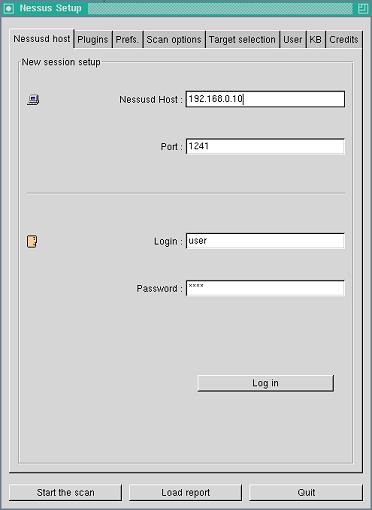
Unix システム用クライアント nessus は、nessus-core パッケージに含まれている。 X Window のターミナルから、nessus を実行する。
# nessus
サーバに nessus ユーザとパスワードを指定してログインする。 認証方法は、~/.nessusrc ファイルで指定する。 クライアント証明書による認証を行うユーザでも、パスワードにはなにか文字を入力しなければならないようだ。 「Log in」ボタンでサーバにログインする。
スキャンのオプションやプラグインの設定をして、「Start the scan」ボタンでスキャンを開始する。
Windows 用クライアント(NessusWX.exe)
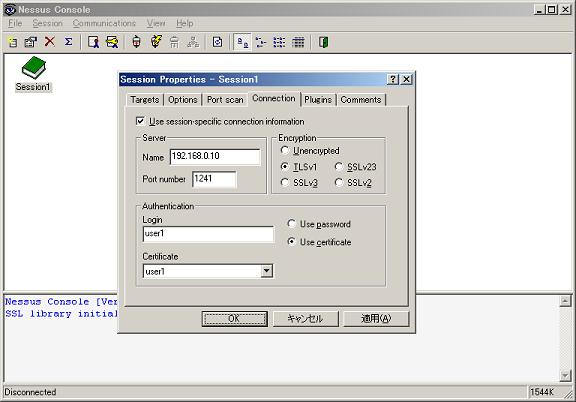
Windows 用クライアント NessusWX.exe は、http://nessuswx.nessus.org/ からダウンロードしてインストールする。 NessusWX.exe を実行して、「Session」メニューの「New」で nessus サーバ、ユーザとパスワード、認証方法(パスワード / クライアント認証)を指定する。 クライアント認証をするには、「File」メニューの「Client Certificate」から、クライアント証明書ファイル cert_nessusmx_(username).pem をインストールしておく必要がある。 スキャンオプションやプラグインの設定も、ここで行う。
作成したセッションを選択して、「Session」メニューの「Execute」をクリックするとスキャンが開始される。